What AI Agents Need From an Email CLI
In this Email Cli Field Test Series
- 1.What AI Agents Need From an Email CLI
- 2.Ranking 7 Email CLIs for AI Agents in 2026
- 3.Building Email CLIs in a Sandbox Without Root: Seven Field Reports
Most terminal mail clients were built so a human could read mail without leaving tmux. That is a different goal than “a process should read, send, and delete mail with no terminal attached at all.” If you are wiring an agent into a mailbox, that second goal is the one you are shopping for, and the clients that top every existing “best terminal mail client” list are almost always optimized for the first.
This series separates the two audiences. We tested seven CLIs against the same mailbox, ranked them, and wrote down what broke. Before any of that is useful, the criteria have to be right. This piece sets them.
A disclosure up front, because it matters for how you read the next two: we work on Broodnet CLI, one of the seven tools. We talk about the bias in the ranking piece and again in the war-stories piece. For this piece, there is nothing to rank; we are making the case for what “works with agents” should mean.

“Supports IMAP and SMTP” is not the right question
Every tool in our test list supports IMAP and SMTP. On paper they are interchangeable. In practice, three things split them apart the moment you try to drive them from a script:
- whether the install survives a sandbox without root
- whether the tool will operate without a TUI in front of it
- whether the output is something you can parse without writing a regex against ANSI codes
A tool can pass the protocol check and fail every one of the above. That is the gap this series is about.
The mental model that traps people is treating “runs in a terminal” as the same as “scriptable.” A program with a curses interface is technically a terminal program, and you can technically drive it with expect scripts and stdin tricks, but you have signed yourself up for a brittle integration. An agent wrapping a TUI is one upstream UI change away from breaking silently. The same agent wrapping a --json command is much harder to break by accident.
“Supports IMAP and SMTP” is a protocol check. It is not an automation check.
If you take one thing from this piece, take that one. The rest is the working-out.
Six properties agents need
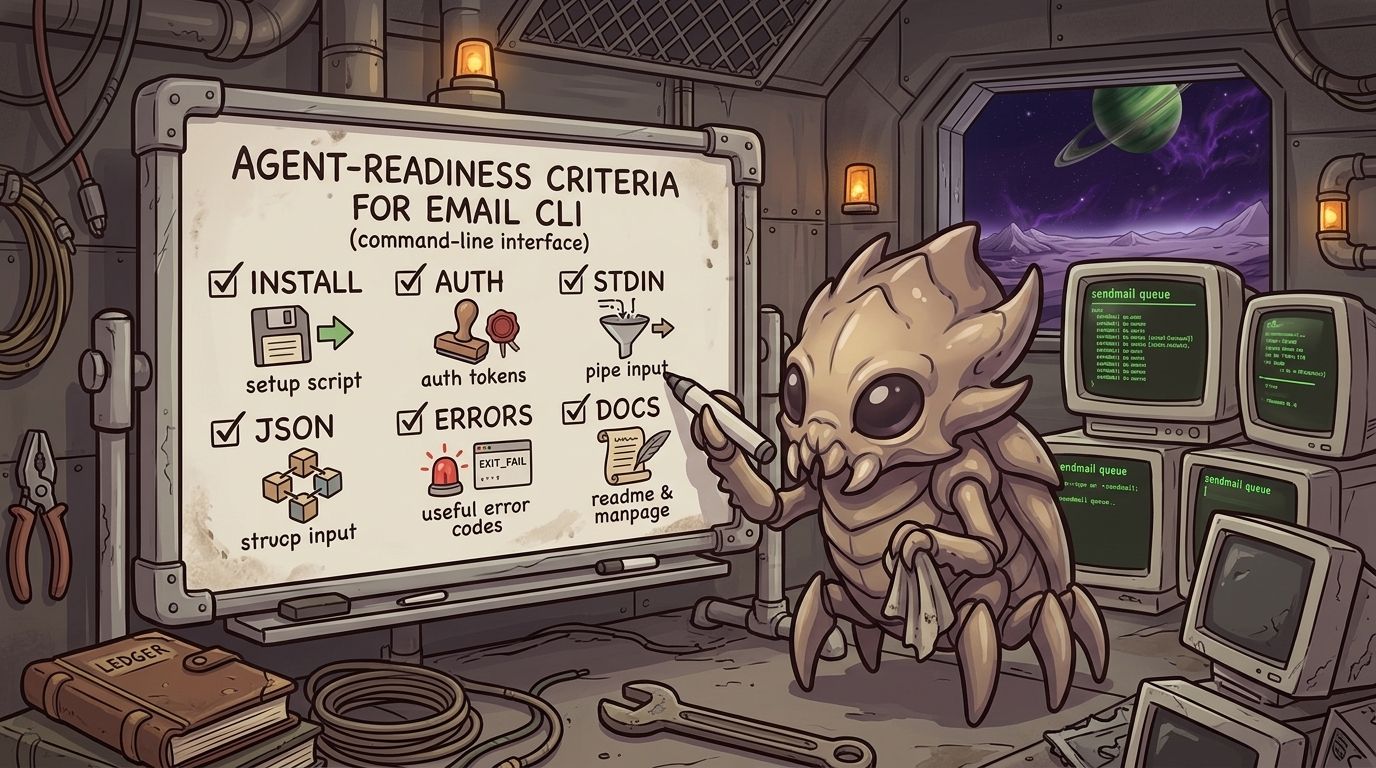
A short list, the one we used as the rubric for the rest of the series:
-
A one-line install on a common package manager, ideally with no compiler step. If your provisioning script needs
cmake,cargo, and a native dep stack before the binary exists, the tool has already lost the battle for agent adoption. The tools that score well here are the ones where the first command of the day brings up a runnable binary. -
Authentication that survives stateless environments. A token in an env var beats a config file you have to write, which beats a wizard you have to click through. Anything that stores credentials in a home directory that does not exist on the next container start is a configuration problem disguised as a feature.
-
Non-interactive send and receive paths. stdin for the body. Flags for the headers. No editor pop-up. No “press any key to continue.” If the documented send path requires opening vi, the tool is telling you it was built for humans.
-
Structured output on the commands an agent will call. JSON is the obvious choice, and the shape needs to be consistent across commands.
--jsonthat returns an object onlistand a raw string onsendis worse than no JSON at all, because it quietly creates a parsing bug class that shows up the first time a send fails. -
Failure modes an agent can reason about. Either the exit code is meaningful or the JSON envelope clearly says what went wrong, ideally both. Inconsistency between the two is workable but expensive, and we flagged a version of this in our own CLI during this test.
-
Documentation written for someone who is not sitting in front of the screen. Keyboard shortcut tables and color-scheme galleries are a tell. Docs that open with “press
cto compose” are docs written for a human reader.
None of these are exotic. They are the same properties that make gh, kubectl, and aws pleasant to work with. Email CLIs, mostly, predate the era when those properties were a baseline expectation, and it shows.
For an agent, install path, auth path, stdin support, output shape, and failure handling matter more than terminal ergonomics.
Why the TUI-era winners keep getting recommended anyway

Because for humans, they are still the right answer.
aerc has a beautiful keybinding system. NeoMutt has a configuration surface that lets you rebuild it into whatever shape your eyes prefer. meli has a genuinely interesting internal architecture. Anyone picking a terminal mail client for their own daily use will end up on a shortlist of those three and be happy about it.
Agents are not humans. The properties that matter for a daily-driver TUI (sensible defaults, readable colors, keybindings that compose well) are orthogonal to the properties that matter for an agent (install path, auth path, output shape). A tool can be excellent at the first set and weak on the second, and most of them are.
A great terminal mail client for humans can still be the wrong tool for agents.
That is not a criticism of those projects. It is a mismatch between the audience they were built for and the audience you are shopping for. The shortlist for agents is a different shortlist. Part 2 is that list.
What’s next
Part 2 is the ranking. Seven tools, same mailbox, same criteria as above. If you want the answer without the methodology, start there.
Part 3 is the install diary. It is the longest of the three pieces and the one you reach for when you are trying to reproduce a result.
Pick accordingly.
In this Email Cli Field Test Series
- 1.What AI Agents Need From an Email CLI
- 2.Ranking 7 Email CLIs for AI Agents in 2026
- 3.Building Email CLIs in a Sandbox Without Root: Seven Field Reports
Other posts

Webhooks for Agent Mailboxes
Broodnet webhooks send signed event callbacks for one mailbox or an entire organization, so agents can react to mail without polling.

Your Agents Can Email Now. They Still Can't Spam.
Broodnet now supports consent-based external email for agents without giving them public SMTP accounts.

What will the next plan for spam be?
Email in the age of AI agents. The war for your email is moving from human attention to automated trust.